How to use UTM parameters to see which links work
 Baltej Singh8 min read
Urchin Tracking Module (UTM) parameters are short tags you add to the end of a link so your analytics tool can tell which campaign sent each visitor. Knowing how to use UTM parameters comes down to three habits: tag every link you share outside your own site with a source, a medium and a campaign; write the values in one agreed format; and keep a log of every tagged link so the names never drift.
Without tags, a launch announcement shared in a newsletter, on LinkedIn and in a partner's Slack group often shows up in reports as a vague mix of "direct" and "referral" traffic. With tags, each of those links reports under its own name. This guide covers what each parameter means, a naming convention a small team can keep, a worked example from a product launch, and how to read the results.
What are UTM parameters?
UTM parameters are name and value pairs added after a question mark at the end of a web address, also called a uniform resource locator (URL). Tools such as Google Analytics read them when someone clicks the link and file the visit under the values you chose. They don't change the page the visitor sees.
Google's Analytics help center lists the parameters it accepts. These five cover almost every startup campaign:
Parameter | The question it answers | Example values |
|---|---|---|
utm_source | Which site, sender or publication sent the visit? | linkedin, newsletter, partner-acme |
utm_medium | What kind of channel was it? | email, social, cpc (cost per click), referral |
utm_campaign | Which campaign or promotion is this part of? | spring-launch, webinar-may |
utm_content | Which version or placement of the link was clicked? | header-button, footer-link |
utm_term | Which paid keyword triggered the ad? | scheduling-app-for-studios |
Google recommends always setting source, medium and campaign. If you set only some, missing values show up as "(not set)" in reports. Google also lists utm_id for a campaign identifier (ID), and a few newer fields, but most early teams can start with the five above.
Values are case sensitive. Google's own example is that utm_source=google and utm_source=Google count as two different sources. That single detail causes most of the messy reports small teams end up with.
How to use UTM parameters on a link
Using UTM parameters means building the link in a fixed order: the page address, a question mark, then each parameter as name=value, joined with ampersands. Here is a tagged link for a newsletter mention:
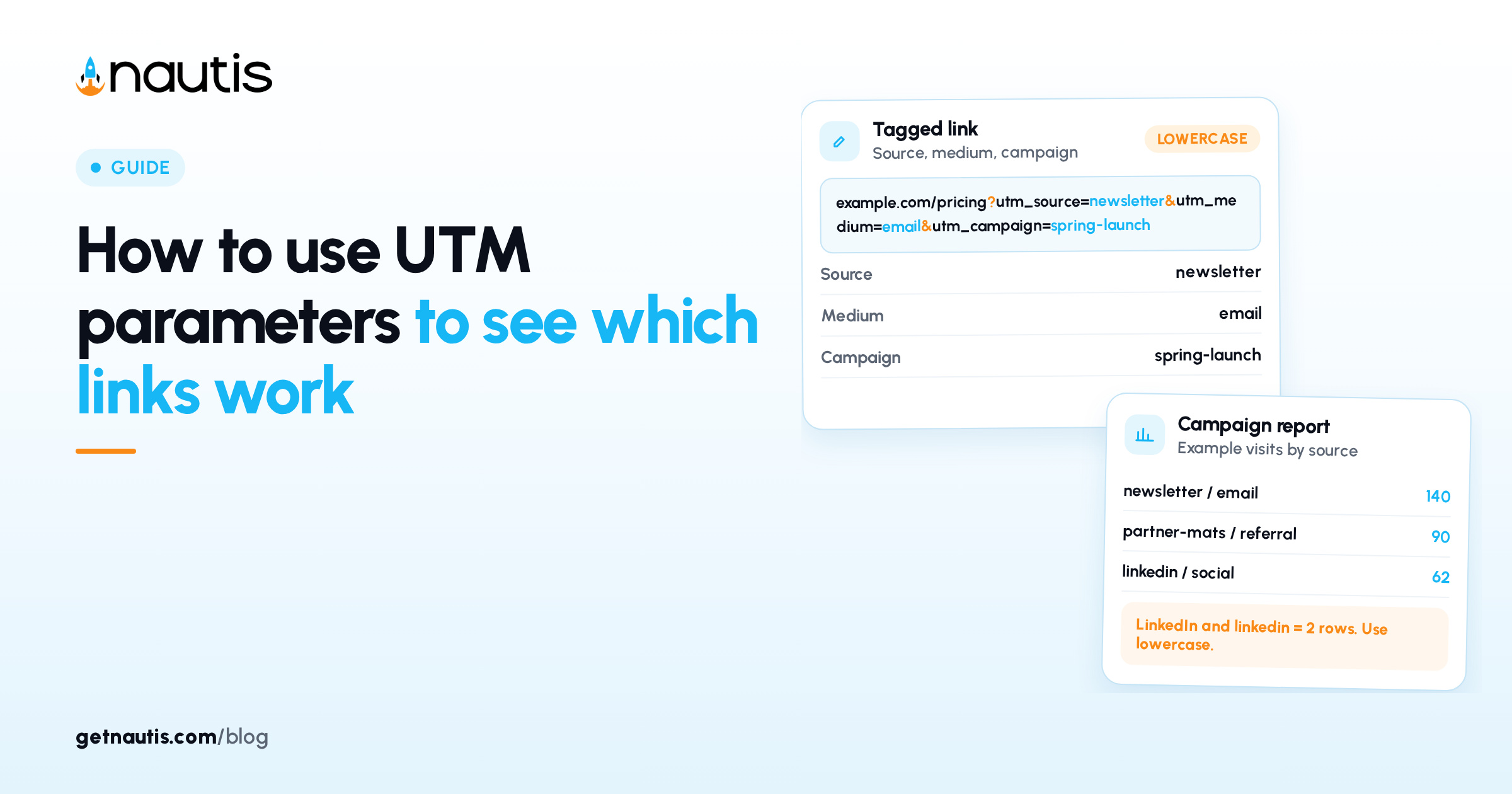
https://example.com/pricing?utm_source=newsletter&utm_medium=email&utm_campaign=spring-launch
To build one by hand:
- Start with the exact page you want people to land on, not your home page by default.
- Add a question mark, then utm_source with its value.
- Add an ampersand, then utm_medium.
- Add an ampersand, then utm_campaign.
- Add utm_content only if the same message contains more than one link to the same page.
- Click the finished link yourself and check that the page loads correctly.
If the page address already contains a question mark, add your tags after an ampersand instead of a second question mark. Google's Campaign URL Builder does the joining for you if you prefer a form to typing.
A naming convention your team can follow
A naming convention is a short written list of rules for how values are spelled. Write it once, put it where everyone who shares links can find it, and treat it as the only allowed spelling.
Rules that work for most small teams:
- Lowercase everything. LinkedIn and linkedin would otherwise split into two rows.
- Use hyphens between words and no spaces. Spaces turn into %20 and are easy to mistype.
- Pick one value per platform for source and never use a synonym. If it's linkedin, it's never li or linked-in.
- Keep the medium list fixed and short, so reports group cleanly.
- Name campaigns after the thing being promoted plus a month or quarter, for example pricing-update-nov.
The medium list deserves the most care, because it's the field reports group by. A starting list could look like this:
utm_medium value | Use it for |
|---|---|
Your own newsletters and email sequences | |
social | Unpaid posts on any social network |
paid-social | Paid ads on social networks |
cpc | Paid search ads, billed per click |
referral | Links placed by partners, communities or other sites |
Flyers, slides and anything with a quick response (QR) code |
Google's guidance makes the same point in its own words: one source value per platform, one medium value per channel, and one campaign name that matches the campaign exactly.
Give one person ownership of the list. When someone needs a new source or medium, they ask that person, who adds it before the link goes out. On a two-person team this takes a minute, and it means nobody has to merge duplicate rows in reports months later.
Example: tagging links for one product launch
Here is an example with a made-up company. Fernway is a two-person startup that sells a class scheduling app to yoga studios. It's launching a new waitlist feature and plans to share one landing page in five places over a week.
The founder builds every link before the launch post goes out, so nobody has to guess a spelling on launch morning:
Where the link appears | utm_source | utm_medium | utm_campaign | utm_content |
|---|---|---|---|---|
Monthly customer newsletter, top button | newsletter | waitlist-launch-nov | top-button | |
Same newsletter, closing paragraph | newsletter | waitlist-launch-nov | closing-link | |
Founder's LinkedIn post | social | waitlist-launch-nov | founder-post | |
Studio owners' Facebook group | social | waitlist-launch-nov | studio-group | |
Partner yoga software blog | partner-mats | referral | waitlist-launch-nov | partner-post |
Two details make this work. The campaign name is identical on every row, so the whole launch adds up in one report. And utm_content separates the two newsletter links, so the founder can see whether people click the top button or read to the end.
A week later, the founder opens the report. Example figures, for illustration only: the newsletter top button sent 140 visits, the closing link 35, and the partner post 90. That tells Fernway the partner blog is worth another post, and that the newsletter's main link belongs near the top.
Which links should not get UTM tags?
Links between pages on your own website shouldn't get UTM tags. Tags exist to describe where a visitor came from before arriving. Tagging your own menu or blog links mixes your navigation into campaign reports and can hide the real outside source.
Skip tags in these cases too:
- Links you print in places where a long address looks broken, unless you shorten it first.
- Links to other companies' websites. Their analytics, not yours, would read the tags.
- Pages that already show strange results with extra parameters. Test the tagged link before sharing.
Avoid putting personal details such as names or email addresses in any UTM value. Tag values end up in reports that the whole team can read.
How do you read UTM results in Google Analytics?
You read UTM results in the Traffic acquisition report, under Acquisition in Google Analytics. Set the main dimension to Session campaign to see whole campaigns, or to Session source/medium to compare individual placements.
A short weekly routine turns the report into decisions:
- Filter the report to one campaign name, for example waitlist-launch-nov.
- Compare sessions by source and medium, then by content if you used it.
- Look past visits to the action you care about, such as waitlist sign-ups, if your analytics setup tracks it.
- Write one decision next to the campaign in your link log: repeat it, change it, or drop it.
Check the report a day or two after each send. A misspelled value is easier to fix before you share the same link again. When the numbers look wrong, the cause is usually one of these:
What you see in the report | Likely cause | What to do |
|---|---|---|
Two rows for one platform, such as LinkedIn and linkedin | Inconsistent capitalization | Switch every future link to lowercase and correct the log |
(not set) in the campaign column | A required parameter was left out | Always include source, medium and campaign |
A shared link shows no tagged visits | The link was copied from the browser bar without tags | Copy links from the log, never from the address bar |
Tagged visits stop after a page move | A redirect dropped the tags | Update the destination and test the link again |
Keeping a link log and shorter links
A link log is a simple spreadsheet with one row per tagged link: date, destination page, the five values, the full tagged link, the short link if you made one, and who shared it. Before creating any new link, check the log for the existing spelling. It takes a few seconds and prevents most naming drift.
Long tagged links look untidy in social posts and slides, so many teams shorten them. If you use Nautis, the URL Shortener has an Add UTM parameters to URL option in the short-link form. Source, medium and campaign are required there, and content and term are optional. Per the help center, you can't change the tags after the short link is created; you delete the link and create a new one. Each short link also has an Analytics view with Total Clicks and Human Clicks, which filters out bots, plus browser, country and referrer breakdowns. The Sheets module works as the link log.
For the rest of a launch, our guides to running a waitlist launch and landing page conversion basics cover what happens after the click. If you're deciding which numbers to watch each week, see what to track first on a startup metrics dashboard.
Frequently asked questions
What are the required UTM parameters?
Google Analytics recommends always using utm_source, utm_medium and utm_campaign. Source names the site or sender, medium names the type of channel, and campaign names the promotion. If you leave any of them out, reports show (not set) for the missing value.
Are UTM parameters case sensitive?
Yes. In Google Analytics, utm_source=google and utm_source=Google count as two different sources. Writing every value in lowercase and keeping a shared list of allowed values prevents split rows in your reports.
Should I use UTM parameters on internal links?
No. UTM tags describe where a visitor came from before reaching your site. Adding them to links between your own pages mixes site navigation into campaign reports and can hide the real outside source of a visit.
Where do I see UTM data in Google Analytics?
Open Acquisition, then the Traffic acquisition report. Set the main dimension to Session campaign to compare campaigns, or to Session source/medium to compare individual placements and channels.
Sources
- Google Analytics Help, Collect campaign data with custom URLs. Checked on November 10, 2026.
- Google Analytics, Campaign URL Builder. Checked on November 10, 2026.
- Nautis Help Center, URL Shortener. Checked on November 10, 2026.
Baltej Singh is a serial entrepreneur, technology leader, and Founder & CEO of Nautis and DemoVexa, with over 16 years of experience building software products, SaaS platforms, and startups. Previously the Co-Founder & CTO of SanchiConnect, he has worked extensively in the DeepTech startup ecosystem, connecting with 200+ venture capital firms and supporting a network of 4,000+ startups. Passionate about AI, automation, and entrepreneurship, he focuses on building innovative products that solve real-world problems and help businesses grow.