How to write a product requirements document engineers use
 Baltej Singh9 min read
A product requirements document (PRD) is a short written agreement about what you are building, who it is for, and how you will know it worked. If you are figuring out how to write a product requirements document at a startup, keep it to one or two pages: the problem, the user, the goal, the requirements with a use case for each, what is out of scope, open questions, and a sign-off line. Write it before design and code start, then update it whenever the plan changes.
A five-person team does not need a contract that runs to dozens of pages. It needs a page that stops the engineer, the designer, and the founder from carrying three versions of the feature in their heads. Atlassian's guide to PRDs, as of November 2026, describes the document as a single source of truth that keeps designers, developers, and stakeholders aligned, and it warns against overly detailed specs in agile teams.
This post walks through each section, then builds one complete example so you can see the finished page instead of a list of headings.
What is a product requirements document at a startup?
It is the page that answers "what does done look like" before anyone opens a design file. At an early company the founder often holds the product vision in their head. That works until the first engineer has a question and guesses the answer. A PRD turns those guesses into decisions that are written down.
ProductPlan's glossary entry, as of November 2026, puts it plainly: the PRD lists what a release must include to be considered complete, and it may hint at an implementation without dictating one. That second half matters. A good requirements page says what the user must be able to do. It leaves the how to the people building it.
You may also hear of a marketing requirements document (MRD), which covers market demand and the business case. At a seed-stage company, fold a two-line business case into the PRD's problem section and skip the MRD.
Signs you need one:
- More than one person will build the feature.
- The work will take longer than about a week.
- A customer asked for it, and you will need to explain later what you shipped and why.
If none of those apply, a short task with a clear description is enough.
How to write a product requirements document in seven sections
Each section serves a reader: the engineer who needs to know what to build, the designer who needs to know who uses it, and you in three months, wondering why you made the calls you made.
Section | What goes in it | Length to aim for |
|---|---|---|
Problem | The user pain, in their words, and the evidence you have | 3 to 5 sentences |
User | Who hits this problem, and in which part of the product | 1 to 2 sentences |
Goal | One measurable change you expect, with a check date | 1 sentence |
Requirements | Numbered items, each with a use case | 4 to 10 items |
Out of scope | What you are deliberately not building now | 3 to 6 bullets |
Open questions | Things you do not know yet, each with an owner | As many as exist |
Sign-off | Who agreed, and on what date | 1 line |
Problem and evidence
Write the problem the way a customer would say it on a call, then add the evidence: support tickets, customer calls, usage data. If the evidence is thin, say so. That is useful information for whoever reads it.
Requirements with use cases
Number each requirement so people can refer to "R3" in comments. ProductPlan's guidance is that each capability should come with a use case showing how a user would use it, and that the use case also informs the test plan. A requirement without a use case tends to get built in the easiest way rather than the useful way.
Add non-functional requirements too: supported browsers or devices, file size limits, and access rights. People forget these until a customer hits them.
Out of scope and assumptions
Writing "no scheduled exports in this release" ends a debate that would otherwise happen in code review. List assumptions next to it, such as "users already have spreadsheet software," and any dependencies, such as a third-party service the feature relies on.
A worked example: a CSV export PRD
Here is one complete page for an example company. The company, the numbers, and the names are invented to show the shape. Swap in your own.
Feature: Export invoices to CSV (comma-separated values) file
Problem. Finance leads at our paying accounts tell us they copy invoice rows into a spreadsheet by hand at month end. In the last quarter (example figures), 14 support tickets and 6 customer calls mentioned this. Two accounts said it is the main reason they keep a second tool.
User. The finance lead or founder at a paying account who closes the books each month. They work on a laptop and open the file in a spreadsheet app.
Goal. Within 60 days of release, at least half of the accounts that raised the request export at least once a month (example target). We check on the 60-day date and record the result.
Requirements.
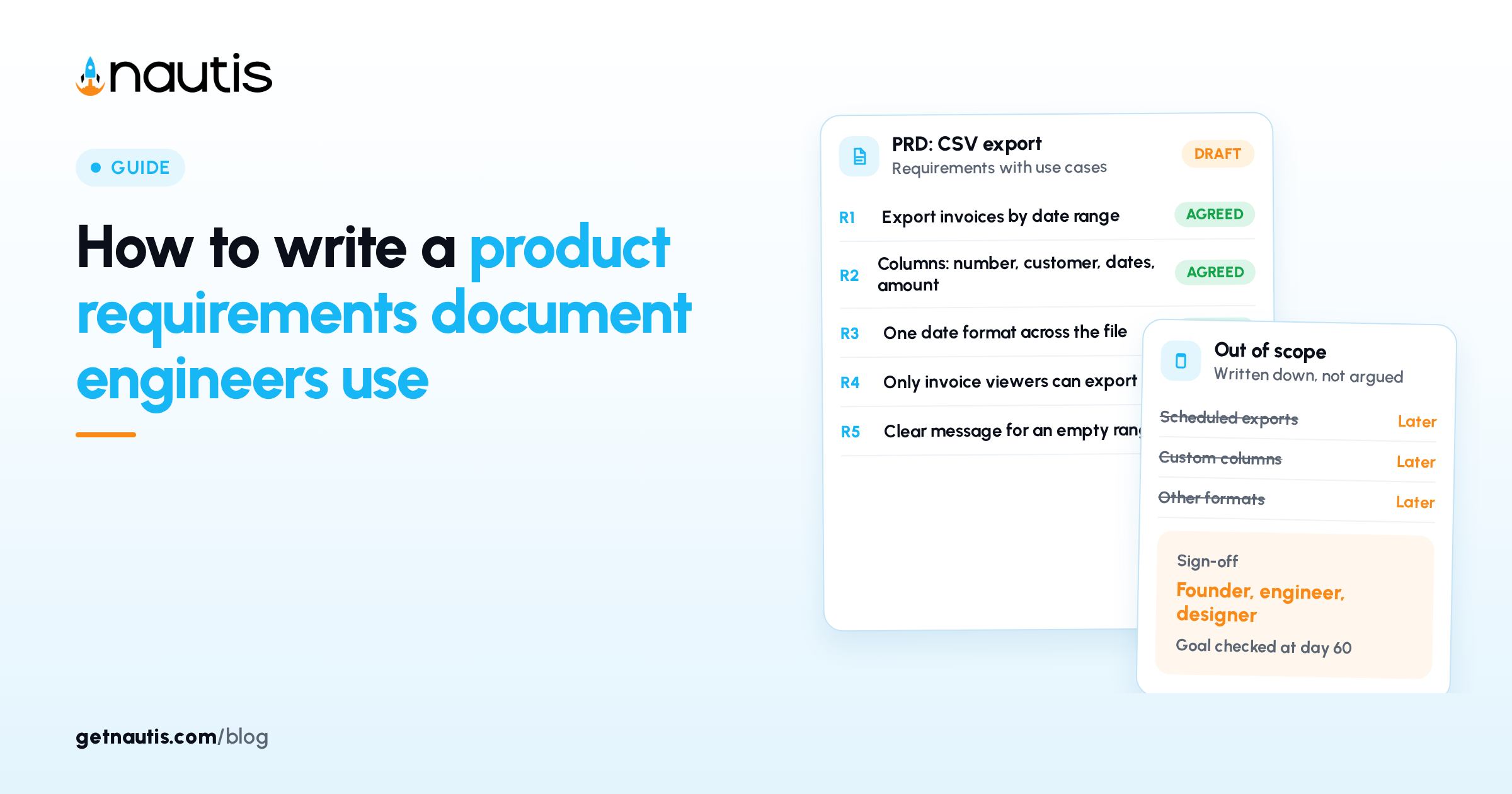
- R1: A user can export all invoices in a chosen date range. Use case: on the 1st of the month, the finance lead picks last month and downloads one file.
- R2: The file includes invoice number, customer name, issue date, due date, amount, currency, and status. Use case: the lead sorts by status to find unpaid invoices.
- R3: Dates use one stated format across the whole file. Use case: the spreadsheet reads the dates as dates without manual fixing.
- R4: Only members with permission to view invoices can export. Use case: a contractor with task access cannot pull financial data.
- R5: If the range has no invoices, the user sees a clear message instead of an empty file. Use case: someone picks the wrong month and understands why.
Out of scope.
- Scheduled or emailed exports.
- Formats other than CSV.
- Custom column selection.
- Exports of expenses or other records.
Assumptions and dependencies. Users have a spreadsheet app. Invoice data already stores currency per invoice.
Open questions.
- Should the file name include the date range? Owner: designer, answer by Thursday.
- How large a range should one export allow before we warn about speed? Owner: engineer, answer after a test with real data.
Sign-off. Founder, engineer, and designer agreed on (date).
There is no database design, no mockup, and no list of every edge case. Those come later, from the people who own them. The page fits on one screen, so people will read it.
Which details should stay out of a PRD?
Leave out anything that belongs to someone else's craft. ProductPlan notes that engineering often writes a functional specification describing how each item will be built, design produces wireframes, and quality assurance writes a test plan from the use cases. Your page feeds those. It does not replace them.
Things that usually do not belong:
- Database tables, API (application programming interface) endpoints, or library choices.
- Pixel-level layouts. A rough flow description is fine.
- Every possible edge case. List the two or three that change the design, and trust the builder with the rest.
A common mistake is writing the solution as the problem. "We need a CSV button on the invoices page" is a solution. "Finance leads re-type invoice data at month end" is a problem, and starting there leaves room for a better answer.
The other mistake is vagueness dressed up as flexibility. "Export should be fast" gives nobody anything to test. "An export of one year of invoices finishes in under ten seconds on our largest account" can be tested. If you do not know the number yet, put it in open questions with an owner.
How long should a PRD be, and who signs off?
For most startup features, one to two pages. If it runs longer, you are probably describing more than one release. Split it.
Sign-off at a small company does not need a formal meeting. Share the draft, give people 24 hours to comment, resolve each comment in writing, and add the names and date. When someone later asks "did we agree to scheduled exports," the answer is on the page.
A simple review order:
- The product owner drafts it in one sitting from real customer evidence.
- The engineer and designer mark anything unclear, risky, or missing.
- You resolve comments, sign off, and link the page from the task list.
If you use a scoring method to decide what gets built, such as the Reach, Impact, Confidence, and Effort score in prioritizing a roadmap with RICE, the PRD comes after that call, not before it. The evidence in the problem section is easiest to gather if you have been running customer discovery calls and taking notes.
Keeping the document current once building starts
A PRD nobody updates becomes a record of what you once thought. When the plan changes during the build, change the page first, then the code.
Practical habits:
- Keep a short change log at the bottom of the page: date, what changed, who agreed.
- On the goal's check date, write down what happened, even if the number missed.
If your team works in Nautis, you can draft the page in Notes, which has a slash menu for headings, lists, and tables, plus folders, tags, comments, and export to a PDF file or a Word document, according to the Notes help guide. You can share a note with someone outside Nautis through a link with an optional password and expiry date, which helps when a contractor or a design partner needs to read it.
The requirements themselves can become tasks. In Task Boards, an Outcome Task is pass or fail, like "R1 export by date range shipped," and a KPI Task (key performance indicator task) tracks a number toward a target, like the share of accounts exporting monthly. For the bigger calls the PRD forces, such as cutting scheduled exports from this release, Decision Loop lets you log the decision with your reasoning and come back in 30, 60, or 90 days to record what happened.
None of that is required. A shared document and a calendar reminder for the check date do the same job, as long as someone updates the page when the plan moves.
Frequently asked questions
How do you write a product requirements document for a small startup?
Write one or two pages covering the problem in the customer's words, the user, one measurable goal, numbered requirements with a use case each, what is out of scope, open questions with owners, and a sign-off line. Share it for 24 hours of comments, resolve each one in writing, and record who agreed and when.
How long should a PRD be?
For most startup features, one to two pages is enough. If it runs much longer, it usually describes more than one release and should be split. A page that fits on one screen is more likely to be read before people start building.
What is the difference between a PRD and an MRD?
A marketing requirements document covers market demand and the business case. A product requirements document covers use cases and the behavior a release needs. Small teams can fold a short business case into the PRD's problem section and skip a separate MRD.
Who should sign off on a product requirements document?
The people who will build and own the feature, usually the founder or product owner, the engineer, and the designer. Sign-off does not need a meeting. Names and a date on the page are enough to settle later questions about what was agreed.
Sources
- Atlassian, How to create a product requirements document (PRD). Checked on November 9, 2026.
- ProductPlan, Product Requirements Document glossary. Checked on November 9, 2026.
- Nautis Help Center, Notes. Checked on November 9, 2026.
- Nautis Help Center, Task Boards. Checked on November 9, 2026.
- Nautis Help Center, Decision Loop. Checked on November 9, 2026.
Baltej Singh is a serial entrepreneur, technology leader, and Founder & CEO of Nautis and DemoVexa, with over 16 years of experience building software products, SaaS platforms, and startups. Previously the Co-Founder & CTO of SanchiConnect, he has worked extensively in the DeepTech startup ecosystem, connecting with 200+ venture capital firms and supporting a network of 4,000+ startups. Passionate about AI, automation, and entrepreneurship, he focuses on building innovative products that solve real-world problems and help businesses grow.